
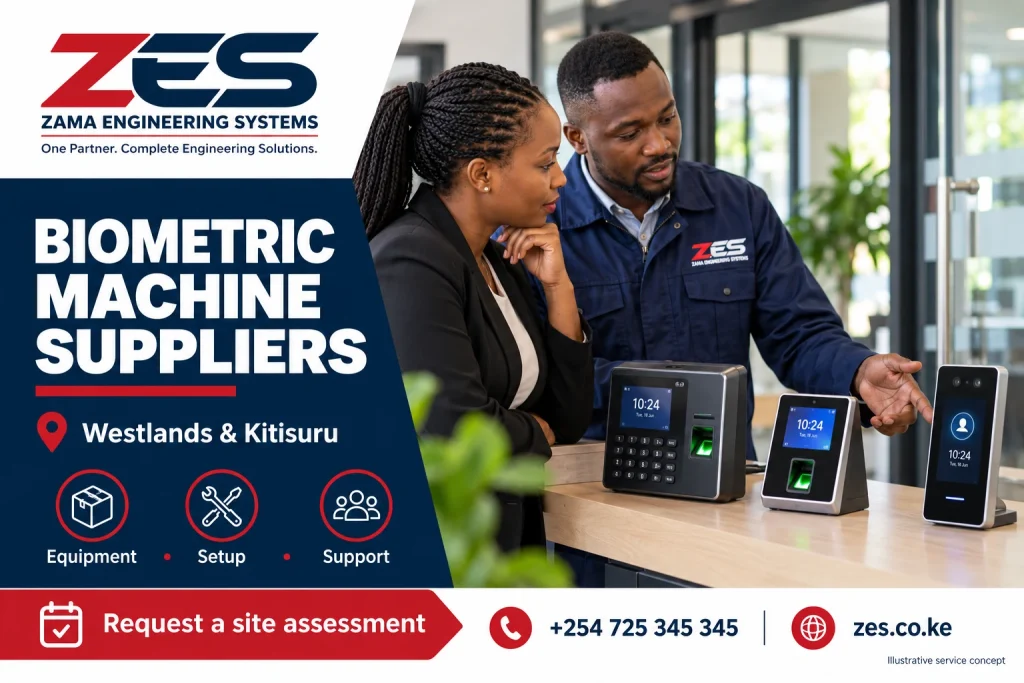
Biometric Machine Suppliers Westlands: Comparing biometric machine suppliers for a Westlands workplace requires more than checking a terminal price. Model suitability, software licences, installation, documentation and support can change the value of an offer. This guide provides a supplier-comparison brief for employers and procurement teams. ZES reviews equipment enquiries and confirms the proposed model, availability, installation and terms in a current written quotation; this article is not a live stock or authorised-distributor claim.
Biometric Machine Suppliers Westlands: Specify a duty rather than an attractive device
State whether the equipment is for attendance, door control, enrolment or several clearly defined functions. Include employee count, peak arrival pattern, sites and the intended reports. Ask which recognition methods and alternatives the exact model supports. A large advertised user capacity does not prove a terminal will deliver a satisfactory arrival experience. Request product documentation and relevant demonstrations so bidders compare against the same intended use rather than offering unrelated machines.
Confirm the software and licence basis
Ask where records are managed, which software version is proposed and which functions are included. Identify user, device and branch limits, hosting arrangements and recurring fees. A terminal package may omit the application needed for useful reporting. Supported interfaces should be checked rather than inferred from product names. Distinguish a manual export from an automated payroll connection. Obtain the responsibilities and dependencies in writing before treating compatibility as part of the purchase.
Separate supply from installation services
Request distinct scope for equipment, accessories, mounting, cables, network, power, configuration, training and tests. Identify work that must be provided by the employer or building contractor. Confirm delivery and any survey or travel charges. Verify availability, warranty and replacement terms in the actual quote. A website product photograph is not a stock confirmation. The comparison should explain which offer leaves staff able to use and administer a working system rather than only receiving a boxed terminal.
Verify claims and support arrangements
Ask for evidence relevant to claimed vendor status, qualifications and delivered scope. Do not infer authorisation from a logo or brand name in marketing. Identify who will provide technical support, what tasks are included and how chargeable work is approved. Confirm access to spare parts and a practical fault-reporting route. Local enquiry coverage is not the same as an office at the customer’s premises or a guaranteed immediate replacement service.
Make acceptance part of procurement
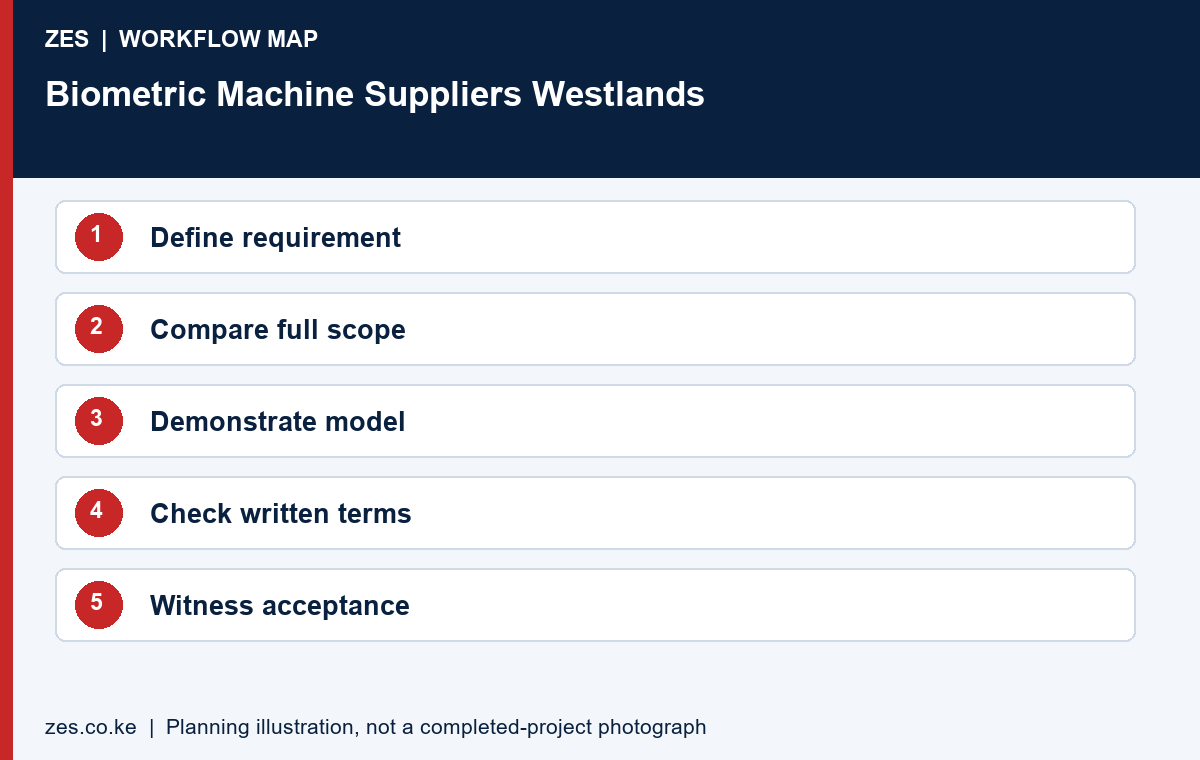
Before approval, agree a demonstration of sample recognition, correct employee association, event transfer and the required report. Include relevant exceptions and connection-loss behaviour. Record the final model, licence basis, account ownership and handover training. ZES can assess the Westlands project brief and confirm the appropriate quotation. A documented comparison supports a better decision than selecting solely by the lowest machine price or the longest list of advertised features.
A supplier comparison with measurable deliverables
Compare quotations against the same user count, device count and agreed outcome. Separate the terminal price from software, licences, installation, networking, commissioning and training. Ask which items are optional and which are necessary for the promised function. Obtain current availability and warranty terms in writing. A low device-only price is useful only when the buyer also understands the cost and responsibility for making it work.
Ask each supplier to demonstrate the intended reporting or access workflow using the proposed model and software. Identify recurring fees, renewal conditions and access to the organisation records. Check any claimed vendor authorisation against evidence rather than assuming that a product logo proves it. The comparison should finish with a named support contact, an acceptance checklist and a clear list of exclusions that the buyer can budget for.
Biometric Machine Suppliers Westlands: supporting guidance
For privacy planning, consult the ODPC guidance notes, including its biometric data guidance. Check equipment and software behaviour against the documentation for the exact proposed version. ZKTeco publishes a ZKBio CVAccess user manual as one product-specific reference; it is not evidence that every device or platform has the same functions. Confirm the model and supported features in your quotation.
A worked example: comparing three different supply offers
Consider an illustrative buyer receiving a biometric machine price, a device-and-software proposal and a complete installation proposal. The three totals cannot be compared fairly until the missing tasks are visible. Prepare one common requirement and ask each supplier to identify its included scope. The result may still favour a device-only purchase, but that decision should reflect the buyer’s ability to complete the remaining work.
List the required biometric machine functions, supporting infrastructure, software, commissioning and training. Ask the suppliers to mark each item as included, excluded or dependent on further assessment. Do not describe an exclusion as a defect when the supplier has clearly quoted a narrower scope. Instead, add the cost and responsibility for that task before comparing the proposals.
Specify equipment by required duty and documented model
Identify whether the biometric machine is intended for attendance, a controlled doorway or a separately assessed combination. State approximate users, clocking points, required outputs and any existing application. Ask for the actual model reference and the software version. A broad device category or a photograph does not provide enough information to establish compatibility with the intended workflow.
Use the proposed documentation to check supported recognition methods, communication and environmental limits. Ask the supplier to explain any feature that depends on another component or licence. Avoid equating a maximum product capacity with practical performance for every workforce. The selected biometric machine should be justified against the assessed requirement and a witnessed demonstration.
Request an itemised installed-cost comparison
Separate biometric machine supply from accessories, mounting, power, networking, software, configuration and training. Identify any customer-supplied work. Ask for recurring charges to be shown separately, with the basis on which they change. Current commercial terms should be confirmed in writing rather than inferred from an old catalogue, generic website price or another customer’s order.
Include delivery and site attendance assumptions. Ask what happens if a surveyed route changes or a supporting system is not ready. Identify how additional work is approved before it is carried out. A complete biometric machine comparison should make these interfaces understandable, so the buyer can budget for a working installation rather than discover the missing tasks after the equipment arrives.
Check supplier claims and proposed warranty handling
Ask for evidence of any manufacturer authorisation or qualification that matters to the procurement. Confirm the actual warranty process and the party responsible for diagnosis, return or replacement. A product logo is not proof of a particular commercial relationship. Keep the comparison focused on verifiable commitments that are relevant to the supplied biometric machine and its installation.
Clarify how warranty handling differs from routine administration or separately requested configuration. Ask which costs are included when equipment needs attention and what information the customer must provide. Avoid a vague statement that every future issue is covered. The proposal should make it possible to distinguish a product fault, a supporting network problem and a change to the original requirement.
Biometric machine procurement: compare the whole system
A biometric machine quotation should identify the proposed model and the outcome it supports. State the intended users, clocking points or doors, recognition method and required reports. Ask the supplier to separate supported functions from features that need another application, licence or component. A biometric machine is not automatically a complete attendance or access-control system simply because the product description mentions both purposes.
Compare the biometric machine with its proposed software and installation scope. Identify hosting, licences, administrator access, supporting power, networking, mounting and training. Ask which components the customer must provide and which are included in the quoted price. A device-only offer and an installed solution can both be legitimate, but they should be compared after the missing responsibilities and costs have been made visible. Avoid deciding from the terminal price alone.
Verify a biometric machine proposal
Request the biometric machine model reference and the documentation for the actual software version. Check the supported connection methods, operating conditions and required accessories against the proposed site. Ask for a demonstration of the intended workflow rather than treating a maximum capacity figure as a performance guarantee. Any claimed manufacturer authorisation, qualification or warranty arrangement should be supported by evidence that the buyer can check.
Biometric machine availability and commercial terms should come from a current written quotation. Confirm delivery assumptions, warranty handling, replacement arrangements and recurring charges. Ask what happens when a licence is not renewed or a supplier relationship ends. Identify the organisation’s access to its own reports and administration accounts. Generic website prices and product photographs do not establish a commitment to a particular model, configuration or delivery date.
Acceptance tests for a supplied biometric machine
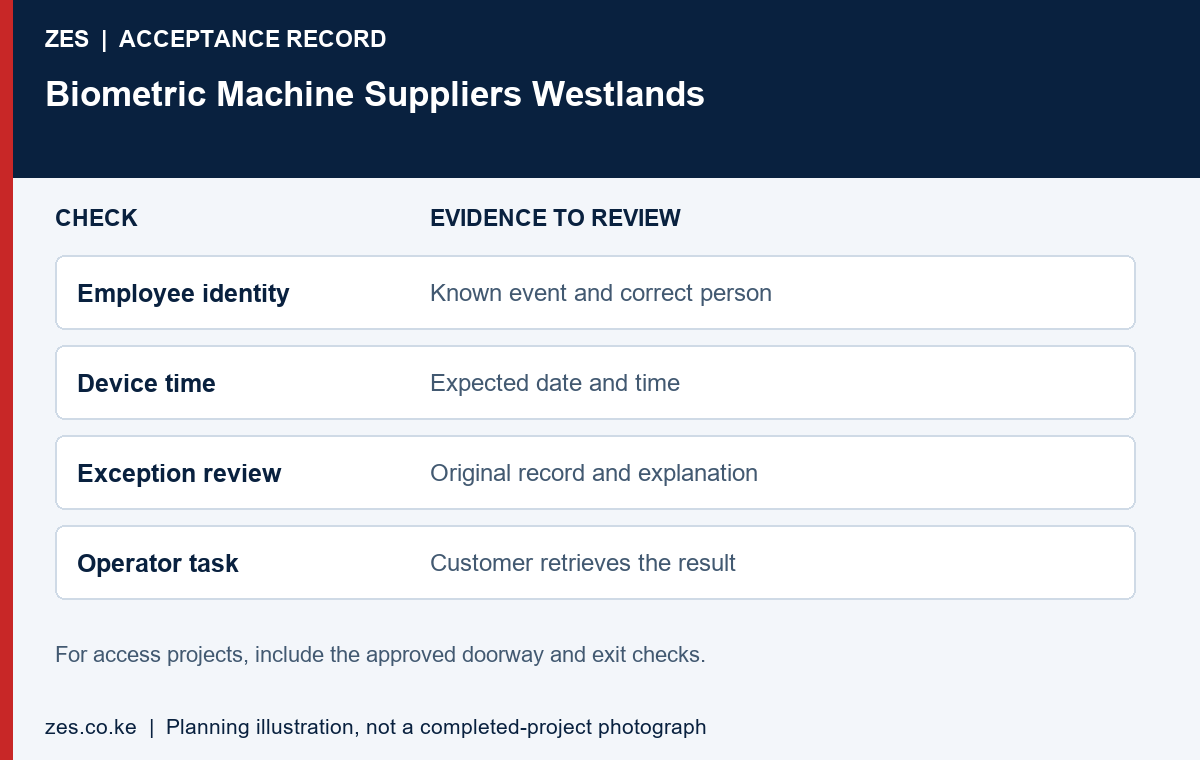
A biometric machine demonstration should use the intended credential method and sample identities. Record an event and retrieve it in the proposed application. If attendance reporting is required, inspect the actual summary or export. If access control is required, include the approved opening and permission checks under the competent design review. The selected demonstration should match the purchased purpose; a recognition message alone does not prove every advertised application function.
Check the biometric machine handover against the quotation. Confirm equipment identification, the licence basis, account owner, completed tests and unresolved items. Have the intended operator perform an ordinary task, such as retrieving a report or raising a support request. Keep passwords and sensitive configuration details out of general procurement attachments. A useful completion record helps the buyer operate the installation and compare the delivered scope with what was ordered.
Budget for ownership of the biometric machine
Biometric machine ownership can involve recurring software, connectivity, maintenance and administrator effort. Ask the supplier to identify recurring items separately from equipment supply and installation. Confirm which costs vary with users, sites or functions. Use the same comparison period across proposals. A lower initial price may be appropriate, but the buyer should understand the operating responsibilities before deciding whether the full proposal fits the organisation’s budget.
Plan how the biometric machine will be supported after the original installer leaves. Identify the contact route, information needed for diagnosis and the limits of included support. Ask whether changes to staff numbers, premises or reporting requirements need a new licence or additional configuration. Keep a copy of the approved scope and equipment details. Future decisions are easier when the installation is documented as an owned business system rather than an unexplained device on a wall.
Use a model-specific demonstration
Ask the supplier to demonstrate the biometric machine with the proposed application rather than a different platform that happens to be available. Use sample identities and a known event. Retrieve the intended attendance output or show the approved access-control function. Record the exact demonstrated configuration and any feature that remains subject to further testing.
Have the intended operator perform a routine task. This can reveal whether additional training or a different administration arrangement is needed. A biometric machine can meet its basic product description while still being a poor fit for the organisation’s operating capacity. The demonstration should therefore address usability as well as the supplier’s ability to produce a successful recognition message.
Review licences, record access and future changes
Identify who owns the biometric machine application’s administrator account and how the organisation retrieves its reports. Ask which functions remain available if a recurring licence is not renewed, using the actual written terms. Confirm whether additional staff, devices or premises change the licensing requirement. Those details can materially affect ownership even where the terminal price is unchanged.
Ask how an extension or replacement would be assessed later. Keep equipment references, configuration ownership and the handover record available to the customer. A documented biometric machine installation is easier to review when staffing, software or premises change. Avoid relying on an undocumented assurance that every future model or payroll application will automatically be compatible.
Set acceptance criteria before placing the order
Write the acceptance criteria beside the biometric machine requirement. Confirm delivery of the identified model, the agreed software and any accessories. Witness the event-to-report or approved doorway test. Check training and account ownership. Record exclusions and outstanding tasks. This helps both buyer and supplier understand the difference between equipment delivery and acceptance of a complete working scope.
Keep the purchase decision and acceptance record connected. If the selected offer excludes installation, identify the party that will complete it and the basis for testing the combined result. If the supplier provides the installed solution, specify the witnessed checks. A clear procurement record prevents an equipment invoice being mistaken for proof that every operational requirement has already been delivered.
Send ZES the Westlands biometric machine requirement
Provide the intended function, approximate users, device count, existing application and relevant site constraints. State whether you need supply only, installation, a replacement assessment or a complete reporting workflow. Include procurement requirements that must be addressed in the quotation. Keep operational biometric records and confidential configuration information out of the initial public enquiry.
ZES can assess the brief and confirm suitable proposal and site-attendance arrangements. Ask for current equipment availability, terms and scope in writing. This page is a buyer guide and does not establish a live stock promise, a fixed biometric machine price, a local branch or an unverified manufacturer-authorised status.
A private and usable project handover
Keep a private implementation file alongside the public buying guide. It should identify the supplied equipment, application arrangement, account owner, support contact and agreed acceptance results. Separate public marketing material from operational configuration and employee records. For an initial enquiry, anonymised examples are usually more useful than a large collection of personal records because they show the required output without exposing information unrelated to the purchase decision.
Ask the responsible organisation to review the purpose, necessity and handling of biometric information with appropriate advisers before live enrolment. The selected product documentation should explain its actual supported functions, but a technical specification does not by itself establish that every proposed use is appropriate. Confirm responsibilities for administration, access to reports, profile withdrawal and the organisation’s approved retention arrangements. Keep those decisions connected to the intended workflow rather than relying on a generic claim that a device is compliant.
Use a short readiness and acceptance record. Before work, confirm the site contact, approved position, enabling tasks and application access. During testing, record the expected result, observed result and unresolved item. At handover, identify who owns the next action and how it will be reviewed. This gives the customer a practical basis for accepting the actual scope, while avoiding a vague completion statement that cannot be compared with the original requirement.
The proposal should also explain how later changes are managed. A new premises, additional users, changed working patterns or another reporting application can create a different requirement. Keep equipment references and the approved scope available for that review. Ask for revised terms and tests where necessary instead of assuming that the original purchase includes every future alteration. Clear documentation is useful to both the customer and the supplier when the people involved in the original project change.
Information to include in your enquiry
Share the site location, organisation type, staff numbers, clocking points or controlled doors, existing devices and software, and the required outcome. Include available layouts and sample reports with personal information removed. Identify the person who approves building access and the person who will administer the system. Ask the quotation to identify assumptions, exclusions, recurring charges, testing and handover responsibilities.
Frequently asked questions
Does this article confirm current stock or prices?
No. Obtain current model availability, installed pricing and written terms for the actual requirement.
Should all suppliers quote the same brief?
Yes. Comparable equipment duties, software, supporting work and acceptance requirements make differences in price and scope visible.
Related Westlands biometric guides
- Biometric Attendance System Westlands: Plan an Office Deployment That Produces Usable Reports
- Fingerprint Attendance System Westlands: Run a Useful Recognition and Enrolment Pilot
Discuss your requirement with ZES
ZES is based in Kamakis, Ruiru and reviews Westlands enquiries before confirming the appropriate assessment and delivery arrangements. Travel, installation timing, equipment availability and support commitments are agreed directly for the actual scope.
Biometric attendance services · Access-control services · Request a quotation · Request a site assessment