

Biometric Access Control Westlands: Biometric access control in Westlands should begin with an access matrix: who may enter each area, during which conditions and with whose approval? A managed building and a tenant employer may have different responsibilities. This guide addresses permission ownership and user administration. It does not replace a doorway or safe-release assessment. ZES can review the intended controlled areas and confirm suitable system and installation responsibilities.

Biometric Access Control Westlands: Separate common-area and tenant permissions
Identify which doors belong to building management and which are controlled by the organisation requesting the work. Record approval authority for each area. Shared reception access does not necessarily authorise changes to a tenant’s permissions or vice versa. Map staff, visitors and contractors separately. The resulting plan should make it clear who decides access policy and who configures the approved decisions, avoiding a deployment in which the installer is expected to resolve conflicting ownership instructions.
Define temporary and role-based access
Specify how short-term visitors, contractors and staff transfers are handled. Ask the proposed system to demonstrate relevant restrictions and their limits. Name the person who approves a change and the person who implements it. Recognition and permission are different checkpoints: a system can recognise someone while correctly denying entry. Do not give every user broad access simply because it makes initial enrolment quicker. Permissions should follow the organisation’s reviewed purpose.
Control administrator authority
Decide which roles can enrol, grant access, revoke permission and view event reports. Avoid informal shared credentials that leave no practical accountability. Record how administrative access is transferred when responsible staff change. The organisation should review the handling of biometric information and communicate its approved process. Use sample identities for demonstrations, rather than sending operational biometric records through messaging or a public quotation form. Identify any third-party platform responsibilities before deployment.
Connect policy to the door assessment
Document the actual door, frame, locking and release requirements with competent parties. If the opening has safety-sensitive responsibilities, those need appropriate review before restrictions are installed. The permission plan cannot establish hardware compatibility or acceptable emergency behaviour by itself. Ask the proposal to identify which party reviews the doorway, which installs each component and how the functions will be tested. Attendance reporting and other integrations remain separately specified requirements.
Test removal as carefully as access granting
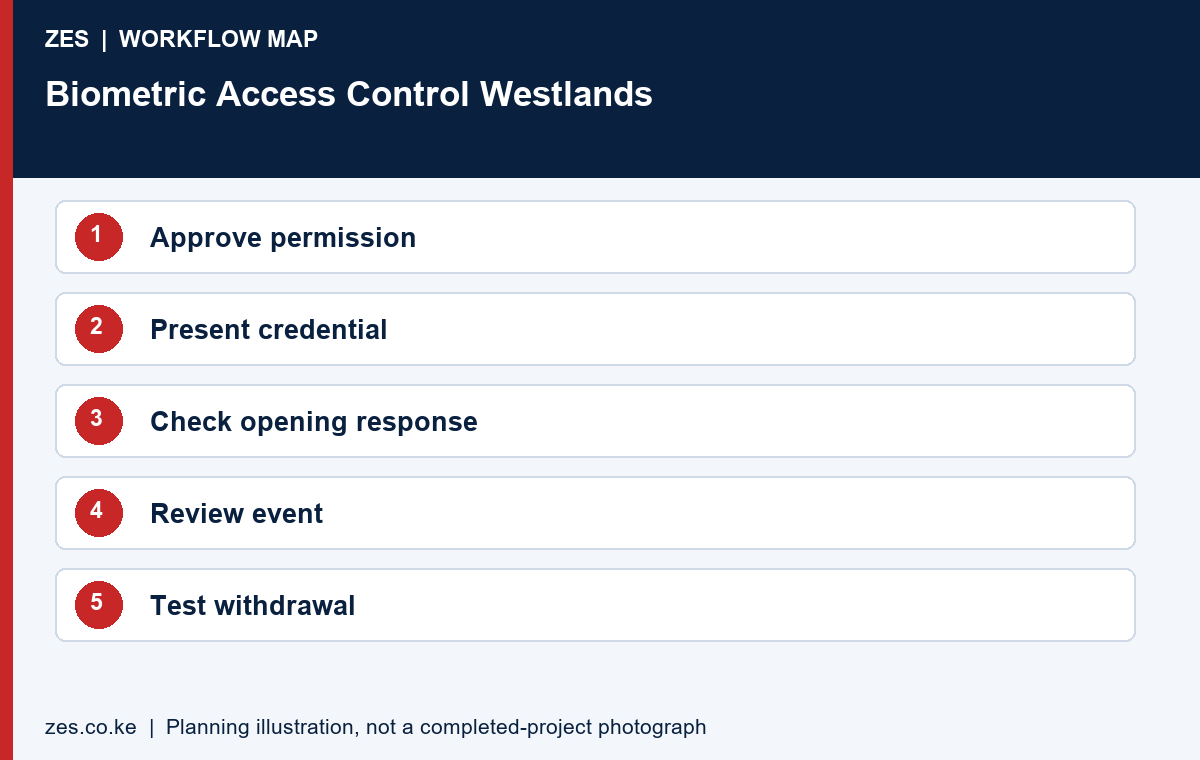
Demonstrate an authorised user, denied user, temporary permission and revoked account where supported. Check the event meanings and report access. Include leaver management and contractor expiry in the operating procedure. Keep equipment, configuration, approvals and support records with authorised management. ZES can review a Westlands brief and confirm assessment, installation and logistics. A controlled handover is especially important where several organisations share the physical premises but retain separate data and policy responsibilities.
An access-control acceptance checklist
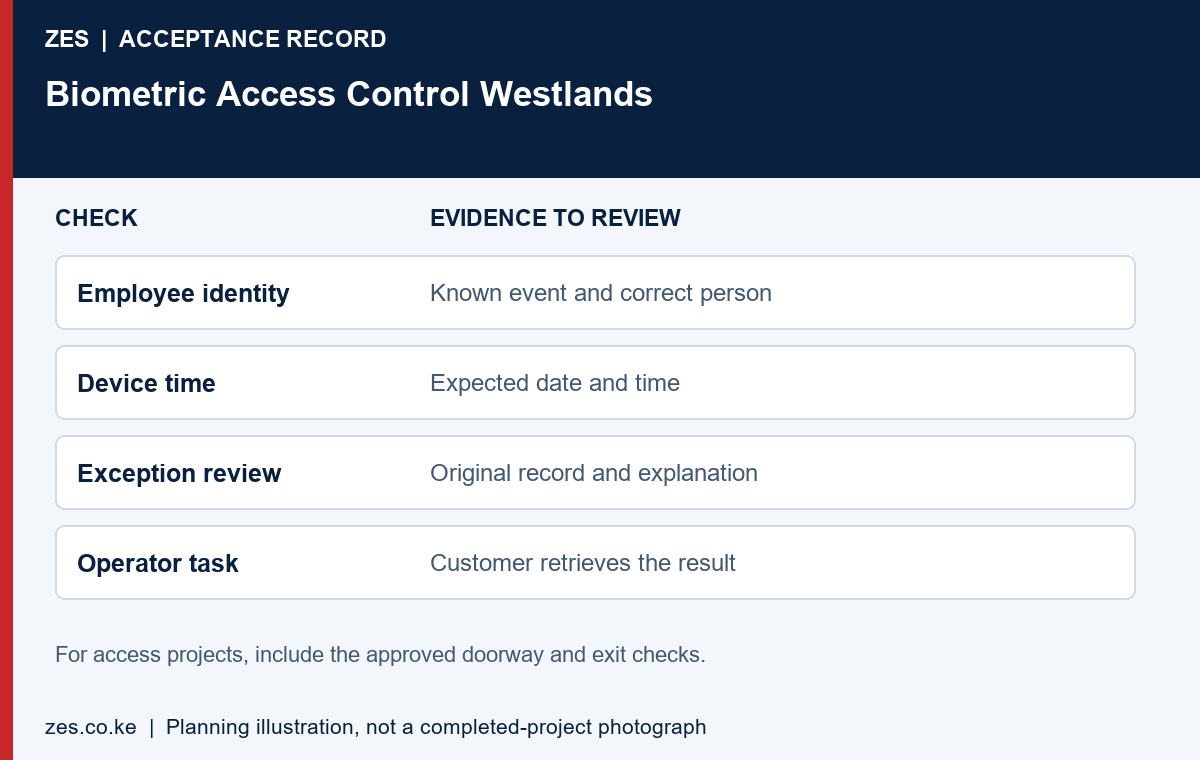
Test an authorised credential, a rejected credential and a credential outside its approved access schedule. Confirm that the response matches the agreed doorway policy and that an administrator can retrieve the relevant event. Test the approved exit arrangements with the responsible site team. A demonstration of entry alone is incomplete: door hardware, emergency egress, power behaviour and operational responsibilities must be addressed in the actual design.
Separate permissions for entering premises from permissions for opening a restricted room. Record who approves changes and who removes access when a person leaves. Establish how visitors and contractors are managed without silently creating permanent staff permissions. Ask for a documented review of the power-loss and connection-loss behaviour of the selected equipment. Site-specific safety decisions should be confirmed by the appropriate competent people before commissioning.
Biometric Access Control Westlands: supporting guidance
For privacy planning, consult the ODPC guidance notes, including its biometric data guidance. Check equipment and software behaviour against the documentation for the exact proposed version. ZKTeco publishes a ZKBio CVAccess user manual as one product-specific reference; it is not evidence that every device or platform has the same functions. Confirm the model and supported features in your quotation.
A worked example: shared reception and a restricted tenant area
Consider an illustrative business that shares a reception but controls its own internal office. Building management may approve reception entry while the tenant approves access to a records room. These are different boundaries. The access control brief should identify each responsible party before anyone assumes that a single credential or application will manage the complete route.
Draw a simple permission map. Show the common entrance, tenant entrance and any restricted area, then identify who can authorise changes at each point. If a boundary is outside the proposed access control project, mark it clearly. This prevents a quotation for one doorway being interpreted as a commitment to integrate every opening and visitor process in the building.
Define roles before choosing credentials
List permanent employees, temporary staff, contractors and visitors separately. For each group, state which area it needs and who approves that permission. Ask whether the proposed access control application can represent those distinctions and how temporary permission ends. Avoid enrolling every person under a permanent employee category simply because that is the easiest demonstration to perform.
Choose credential methods after the operational requirements have been reviewed. Demonstrate the supported enrolment, recognition and withdrawal processes. Consider an appropriate alternative where a person cannot use the proposed method reliably or appropriately. The access control design should support an approved process for exceptions rather than leaving reception staff to invent an uncontrolled workaround during a busy period.
Survey each opening and its supporting systems
For each proposed opening, provide the actual door or gate details and identify the person responsible for its design and safe operation. Ask competent parties to assess hardware suitability, release and exit arrangements, supporting power and relevant interfaces. A photograph may help plan an assessment, but it does not establish that a particular lock or reader is suitable.
Document the proposed access control components and the evidence needed to confirm compatibility. Where another contractor supplies part of the opening, identify that interface in the scope. Keep attendance reporting, intercom and surveillance requirements explicit rather than assuming that any device with a network connection can exchange the required information with every other system.
Test schedules and restricted-area permissions
Prepare invented identities for an ordinary employee, a restricted-area user and a temporary contractor. Ask the access control demonstration to show the permitted and rejected cases. If schedules are included, test an event outside the approved period. Observe the actual opening response and available administration record rather than relying only on a screenshot of the permission settings.
Document the expected result for each sample identity and opening. If several sites or controllers are included, demonstrate how changes reach the relevant components. Record supported limitations and the customer’s operational response. A successful access control test should establish the agreed boundary and rules; it should not be described as proof of functions that were outside the demonstration.
Access control: define a permission matrix
An access control brief should identify people, areas, schedules and approval authority. List the actual controlled openings and user groups rather than describing the whole premises as one unrestricted zone. Distinguish employees, contractors and visitors. For each group, identify the person who approves access and the circumstances in which it changes. This matrix gives the supplier something measurable to configure and helps the customer recognise requirements that may need additional hardware or software.
Keep access control permissions separate from general attendance reporting unless the organisation has explicitly assessed the intended connection. A person may enter a building for an authorised meeting without following a normal staff schedule. Conversely, a staff member may perform approved duties away from the building. Explain which events will be used for which purpose. The technology should support the agreed operating rules rather than silently turning every access event into a payroll or performance decision.
Doorway design and operating responsibilities
Access control equipment must be considered with the actual door, gate or barrier. Ask appropriate competent parties to assess locking, release, exit arrangements, supporting power and interaction with other systems. Record the proposed components and how compatibility will be established. A reader’s recognition capability does not prove that any lock can be fitted to any opening. Avoid making commissioning decisions from a photograph or a generic product description alone.
Agree access control behaviour during power loss, connection loss and an operational incident. Demonstrate the approved arrangement under a planned test with the responsible site team. Document who has authority to operate any manual procedure and when normal operation is restored. The required safety and security balance depends on the premises and its competent design review. It should not be selected casually by changing a reader setting without considering the opening and the people using it.
Test access control permissions and removal
Test access control with an authorised user, a rejected credential, a user outside the permitted schedule and a removed sample profile. Compare the expected response with the observed opening behaviour and available event record. Where several openings are included, test the agreed permission differences. Record limitations clearly. A successful entry test at one door does not establish that every scheduled permission and withdrawal function works across the whole installation.
Make access control changes reviewable. Identify who requests a change, who approves it and who applies it. Ask the selected software to show the available administration history and account permissions. Agree a practical process if some controls depend on written procedures rather than built-in restrictions. Include temporary access expiry and a leaver example in the handover. The customer should be able to explain how permissions are kept current after the original project team has moved on.
Access control handover and ongoing review
The access control handover should identify controlled openings, equipment, account ownership, approved settings and support arrangements. Give the responsible manager an accessible copy of the permission plan and a procedure for raising faults. Transfer sensitive configuration information through an appropriate private channel. Do not place passwords, internal network details or unrestricted access instructions in public project material. Public marketing photographs and private commissioning evidence serve different purposes.
Review access control when the premises, occupancy or staffing changes. A newly partitioned office, a changed visitor route or a revised contractor arrangement can alter the original requirement. Assess whether the existing design remains appropriate before extending it. Keep maintenance aligned with the selected products and the approved operating plan. Any ongoing service promise should identify its actual coverage and response arrangements rather than relying on a broad claim that all possible faults are automatically included.
Plan visitor and contractor administration
Describe how a visitor is approved, received and directed to the intended destination. Identify whether the access control project includes a visitor application or only a controlled opening. Ask what information must be recorded and who can access it. Avoid collecting information simply because a form has an available field; the responsible organisation should define the approved purpose and handling.
For contractors, specify the person who approves temporary access and the process for changes or expiry. Test removal using a sample credential. Keep emergency and operational responsibilities with the appropriate site team. A visitor or contractor process should remain workable when the usual receptionist is absent, with a documented escalation route for unusual requests.
Agree private administration and customer ownership
Assign access control administration accounts to authorised roles and establish a practical review process. Ask the selected application to demonstrate the available restrictions and history. If a required separation depends on an operating procedure, make that limitation visible. Keep configuration and account transfer details private, especially when procurement documents will circulate beyond the implementation team.
The customer should understand who owns the application account, licences and configuration records. Identify how authorised administrators retrieve the information needed for ongoing management. A supplier can provide support without leaving the organisation uncertain about its own access control arrangements. Record the support route and approval process for changes before commissioning is treated as complete.
Use a planned handover and a later review
Witness recognition, rejected access, schedule restrictions, a changed permission and removal of a sample user. Include the approved doorway operating checks with the responsible competent parties. List incomplete work and assign responsibility. The access control handover should connect each completed test to the original brief and identify any functions requiring separate future work.
Review the arrangement when occupancy, partitions, staffing or contractor routes change. An access control design suited to the original premises may need reassessment after a layout change. Keep the permission map and equipment references current. This creates a practical basis for maintenance and extensions without assuming that an earlier commissioning record covers every later change.
Send ZES a Westlands access control enquiry
Describe the controlled openings, user groups, existing equipment and intended operating rules. State which boundaries belong to the tenant and which belong to building management. Include approved layouts or photographs where useful, with confidential information removed. Identify the person who can approve the work and the parties responsible for doorway design and operational safety.
ZES can review the brief and confirm the assessment and proposal arrangements. Ask the scope to identify components, interfaces, responsibilities and acceptance tests. Current timing, travel and support terms are agreed directly. This guide does not establish a completed installation at a named Westlands building or a blanket guarantee about any proposed door hardware.
A private and usable project handover
Keep a private implementation file alongside the public buying guide. It should identify the supplied equipment, application arrangement, account owner, support contact and agreed acceptance results. Separate public marketing material from operational configuration and employee records. For an initial enquiry, anonymised examples are usually more useful than a large collection of personal records because they show the required output without exposing information unrelated to the purchase decision.
Ask the responsible organisation to review the purpose, necessity and handling of biometric information with appropriate advisers before live enrolment. The selected product documentation should explain its actual supported functions, but a technical specification does not by itself establish that every proposed use is appropriate. Confirm responsibilities for administration, access to reports, profile withdrawal and the organisation’s approved retention arrangements. Keep those decisions connected to the intended workflow rather than relying on a generic claim that a device is compliant.
Use a short readiness and acceptance record. Before work, confirm the site contact, approved position, enabling tasks and application access. During testing, record the expected result, observed result and unresolved item. At handover, identify who owns the next action and how it will be reviewed. This gives the customer a practical basis for accepting the actual scope, while avoiding a vague completion statement that cannot be compared with the original requirement.
The proposal should also explain how later changes are managed. A new premises, additional users, changed working patterns or another reporting application can create a different requirement. Keep equipment references and the approved scope available for that review. Ask for revised terms and tests where necessary instead of assuming that the original purchase includes every future alteration. Clear documentation is useful to both the customer and the supplier when the people involved in the original project change.
Information to include in your enquiry
Share the site location, organisation type, staff numbers, clocking points or controlled doors, existing devices and software, and the required outcome. Include available layouts and sample reports with personal information removed. Identify the person who approves building access and the person who will administer the system. Ask the quotation to identify assumptions, exclusions, recurring charges, testing and handover responsibilities.
Frequently asked questions
Can the tenant control all building doors?
Only within properly agreed authority and a suitable system scope. Establish building-management and tenant responsibilities first.
Can access events be used as attendance records?
Assess event meaning, permissions, software and the employer’s approved reporting process before relying on that use.
Related Westlands biometric guides
- Employee Attendance System Westlands: Hybrid Duties, Daily Exceptions and Reviewable Reports
- Biometric Attendance System Westlands: Plan an Office Deployment That Produces Usable Reports
Discuss your requirement with ZES
ZES is based in Kamakis, Ruiru and reviews Westlands enquiries before confirming the appropriate assessment and delivery arrangements. Travel, installation timing, equipment availability and support commitments are agreed directly for the actual scope.
Biometric attendance services · Access-control services · Request a quotation · Request a site assessment