
Employee Attendance System Kitisuru: An employee attendance system in Kitisuru needs a clear way to record approved duties that do not fit a simple arrival-and-departure pattern. Staff may change tasks, attend another premises or work an authorised alternative schedule. This guide focuses on how an employer reviews those circumstances after a system is selected. ZES can assess technical reporting requirements, while the responsible organisation approves working rules and the decisions it makes using attendance information.
Employee Attendance System Kitisuru: Describe the approved working day
List normal schedules and how authorised changes are communicated. Include duties away from the clocking point and the person who confirms them. Do not let a default software template become the employment policy by accident. Explain staff expectations and a practical reporting route before routine use. A device timestamp cannot independently describe every task performed or establish whether a different location or schedule was authorised.
Name a reviewer rather than relying on automation
Assign responsibility for missing events, duplicates and recurring recognition issues. Check whether several employees are affected by the same schedule or connection problem. Daily review makes it easier to distinguish technical faults from individual exceptions. Record who may approve a correction and what information supports it. A small workforce still needs this accountability; familiarity with staff is not a substitute for a consistent process that remains understandable when the administrator is absent.
Handle missed events transparently
Give employees a way to explain an apparent gap and provide the appropriate approval information. Keep raw events distinguishable from reviewed summaries. Do not repeatedly amend records without a reason simply to make a monthly report appear complete. Agree how unresolved items remain visible. The employer should follow its reviewed policies and appropriate advice before making consequential decisions. The technology supports recordkeeping, but does not remove the need to consider relevant circumstances.
Test the report people will actually use
Use sample identities to show an ordinary day, changed hours, authorised off-site duty and an approved correction. Review the output with the intended manager. Choose fields and access appropriate to each role. A report can be technically complete yet confusing if labels and exception status are unclear. If payroll preparation is required, specify the export or interface and validate it separately. Do not infer automation from the availability of a download button.
Keep procedures current as work changes
Update identifiers, schedules and permissions when personnel or duties change. Retain the process, account ownership and support route with organisational records. Review the administrative effort after normal use before buying additional terminals. ZES can assess configuration, device and compatible software requirements against an agreed Kitisuru scope. Site attendance and travel are confirmed directly. A useful system is one the organisation can operate and explain without rebuilding its records from memory every reporting period.
A reporting review before the first live period
Ask the administrator to produce a sample attendance report for an agreed date range. Compare it with a small set of known events and approved schedules. Include an arrival, a departure, a missed event and a changed duty. Check how authorised corrections are recorded and reviewed. The report should help an employer investigate exceptions while preserving a clear distinction between recorded events and the employer decisions made from them.
Before introducing a payroll interface, agree its actual fields, format and ownership. Test sample exports with the receiving team and identify how rejected or incomplete records are handled. Do not assume that a device brand proves integration with an existing payroll application. Keep the initial reporting period manageable, nominate a reviewer and resolve discrepancies before relying on an automated transfer for operational decisions.
Employee Attendance System Kitisuru: supporting guidance
For privacy planning, consult the ODPC guidance notes, including its biometric data guidance. Check equipment and software behaviour against the documentation for the exact proposed version. ZKTeco publishes a ZKBio CVAccess user manual as one product-specific reference; it is not evidence that every device or platform has the same functions. Confirm the model and supported features in your quotation.
A worked example: changing duties during a reporting period
Consider an illustrative employer whose staff sometimes change tasks, work locations or reporting responsibilities during a period. An employee attendance system should help the organisation retrieve events and review approved explanations without assuming that every working day follows one unchanging pattern. Begin by identifying the required summary and the people responsible for interpreting it.
Create invented examples covering a normal day, a changed duty and an unexplained missed clocking. Ask the attendance system reviewer to show how each case is handled. The equipment should provide attributable event information while the employer’s approved process addresses the explanation. This distinction is useful before anyone treats a machine-generated status label as a complete decision about the employee’s work.
Design a reporting routine the organisation can maintain
Identify the daily and period-end tasks required from the attendance system administrator. Include retrieving events, checking exceptions, collecting explanations and preparing the agreed summary. Assign those tasks to named roles and allow realistic review time. A smaller employer should be able to understand the operating effort before selecting a platform with additional functions it may not need.
Ask the intended operator to prepare a sample period under supervision. Record where the operator needs instructions or supplier assistance. If the organisation needs cover for leave, let the backup person perform a routine task too. The attendance system should remain usable beyond the original demonstration, with a short process that staff can follow during an actual reporting deadline.
Maintain consistent identities and organisational information
Check the attendance system employee identifier, department and location fields against an approved sample list. Ask how a change of department or duty affects current and historical reports. Avoid creating a second employee profile merely to reflect a routine change that the selected application can represent appropriately. Duplicate identities can make a period summary difficult to review.
Record who can change organisational information and who checks the result. Use a sample change during acceptance and retrieve the relevant report. If a requested view depends on another licence, configuration or separate development, identify that requirement clearly. The customer should understand the delivered attendance system rather than rely on an unsupported promise that every future reporting layout is automatically included.
Keep missed events and approved corrections distinguishable
Agree how a staff member reports a missed event and what information the reviewer needs. Ask the attendance system demonstration to show the original record, requested explanation and resulting approved correction wherever supported. Identify which functions are controlled by application permissions and which depend on a written operating procedure.
Test a late request and a rejected correction with invented data. Keep the decision with the employer’s authorised reviewer under its approved approach. An attendance system should make the review practical and attributable, without silently substituting a technical default for an employment decision. Give staff a clear contact route for questions so exceptions do not depend on informal messages to an unavailable administrator.
Attendance system reporting: define the review cycle
An employee attendance system should fit the organisation’s actual reporting cycle. Identify who checks daily exceptions, who reviews period summaries and who approves information for the next process. Describe the required outputs with anonymised examples. A terminal’s list of recognition events and a manager’s reviewed attendance summary are different deliverables. The attendance system proposal should state which outputs are included and what administration is required to produce them.
Define the meaning of attendance system fields before importing or exporting records. Check employee identifiers, department assignments, date ranges, work locations and status labels. Ask what happens when a person changes department or works an approved duty at another premises. A field called overtime, absence or late arrival should not be assumed to implement the organisation’s policy without review. The employer remains responsible for its approved rules and consequential decisions.
Attendance system corrections and disputed events
Agree how an attendance system missed event is reported and reviewed. Keep the original event, the requested explanation and the approved correction distinguishable wherever the application supports it. Identify who can make a change and who can review the history. Use invented records to demonstrate a normal correction, a rejected request and an entry submitted after the reporting period. This exposes practical limitations before users depend on the workflow.
Provide an attendance system route for staff questions. Explain the clocking method, the person to contact and the information needed to investigate a discrepancy. Avoid presenting the machine as an infallible account of every activity performed that day. Review equipment problems, approved off-site work and changed duties through the organisation’s process. A reasonable operating guide helps staff distinguish a failed attempt from a recorded event that still requires managerial interpretation.
Compare attendance system exports with downstream requirements
Before promising a payroll connection, compare the attendance system output with the receiving application’s documented requirements. Ask the receiving team to check a sample file using invented identities. Confirm date formats, identifiers, blank fields and the treatment of approved changes. Identify whether the proposed deliverable is a manual export, a supported interface or a separately scoped integration. These options involve different responsibilities and should not be described as interchangeable.
Test an attendance system export through one complete sample reporting period. Check that the selected date range matches the intended records and that the receiving team can identify exceptions. Record any manual steps and who performs them. If automatic transfer is proposed, specify how failures are detected and how corrected records are reconciled. A successful one-off transfer is useful evidence, but it does not remove the need for ongoing ownership and exception handling.
Keep the attendance system usable after handover
Attendance system continuity should include account ownership, routine exports, support escalation and administrator cover. Train more than one authorised person where the organisation needs cover for leave or staff changes. Keep the instructions short enough to use during an actual reporting deadline. Identify which tasks require technical support and which are ordinary administration. The customer should understand the application and licence arrangement before it becomes essential to a recurring business process.
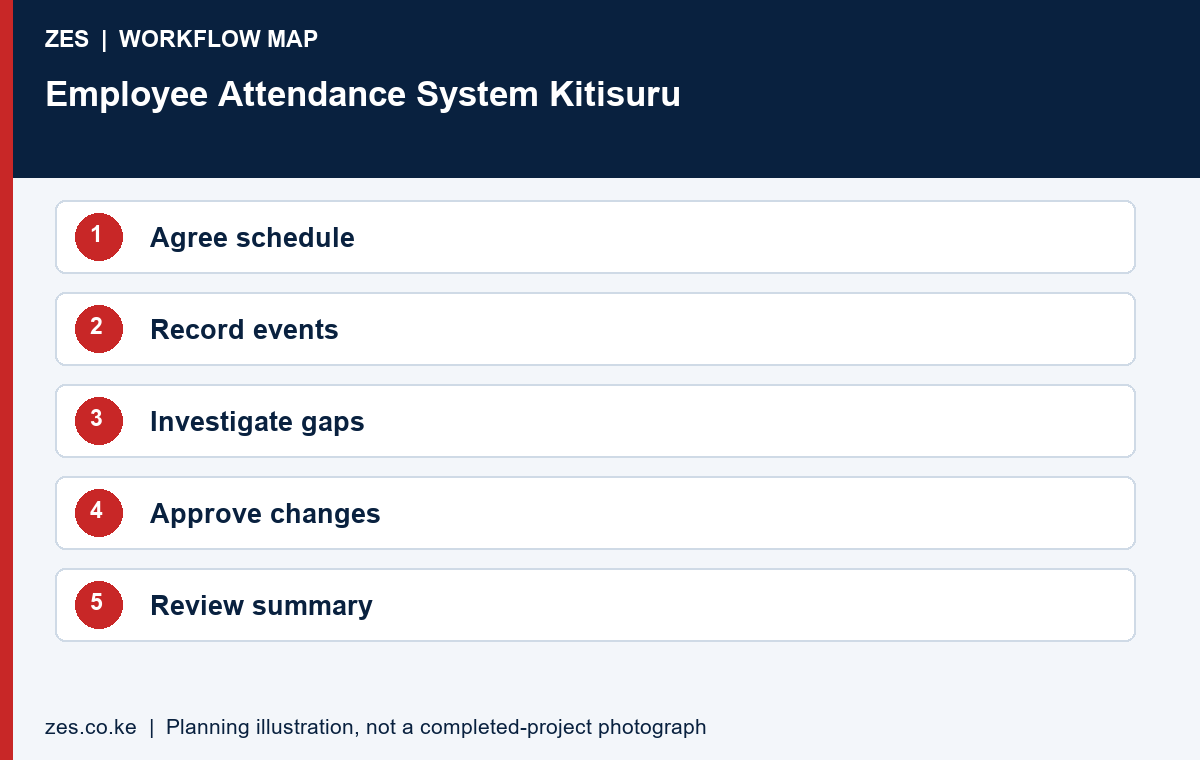
Review the attendance system after the first live period. Compare its output with the agreed examples and list the causes of unresolved discrepancies. Check whether staff know how to raise a missed event and whether reviewers have enough time to act. Adjust the approved process through a documented change rather than silently rewriting past results. Measure success against usable, reviewable records and manageable administration, rather than the number of features displayed in a product brochure.
Choose the right output for the intended recipient
Ask each intended attendance system recipient to inspect an anonymised sample. A supervisor may need an exception list while another authorised team needs a reviewed period summary. Check what information is necessary for the task and whether the selected report provides enough context to investigate a discrepancy. Avoid sending an unexplained event dump when the requirement is a clear reviewed output.
Record the approved report fields and date boundaries. If an export feeds another application, compare it with that receiving team’s actual requirements. Identify whether the proposed delivery is a manual file or a supported integration. A sample transfer is useful evidence, but the attendance system proposal also needs an owner for failed transfers, corrections and reconciliation.
Review hosting and continued access to records
Identify the attendance system application, hosting arrangement, licences and recurring responsibilities. Ask how the organisation retrieves its own reports and what assistance is included. Confirm which tasks belong to the customer and which belong to the supplier. A description such as cloud-based or locally installed does not by itself explain backup, retention, recovery or the organisation’s ability to administer the system.
Keep account ownership and configuration references in the customer’s private handover file. Transfer sensitive access appropriately. Plan administrator cover and a support route for technical issues. The attendance system should remain manageable if the original manager changes, rather than leave the organisation uncertain about how to obtain an ordinary report from an essential recurring process.
Use a first-period review to improve operation
Compare the attendance system’s first complete period with the agreed sample cases. List gaps and classify whether they concern training, configuration, a supporting connection or the employer’s own review process. Assign a person to each unresolved item. This makes follow-up more useful than assuming that replacing a terminal will resolve every reporting difficulty.
Check whether staff understand the clocking method and the route for exceptions. Confirm that reviewers can retrieve the records needed to explain a result. Assess whether the recurring workload fits the organisation’s capacity. A practical attendance system should support usable and reviewable records; a sophisticated dashboard is not sufficient if nobody can complete the agreed reporting routine.
Prepare a Kitisuru employee attendance enquiry
Provide ZES with the workforce, locations, existing applications and required reports. Explain changing duties, off-site work or other approved situations the attendance system needs to represent. Share anonymised examples and identify the HR, management and IT contacts involved. Describe the intended operating process before requesting a particular terminal or software brand.
Ask the quotation to distinguish equipment, software, configuration, training, interfaces and support. Confirm site assessment and delivery arrangements directly for the actual premises. This page is an employee-record planning guide and does not claim an existing local deployment, a guaranteed payroll connection or a measured business improvement that has not been verified.
A private and usable project handover
Keep a private implementation file alongside the public buying guide. It should identify the supplied equipment, application arrangement, account owner, support contact and agreed acceptance results. Separate public marketing material from operational configuration and employee records. For an initial enquiry, anonymised examples are usually more useful than a large collection of personal records because they show the required output without exposing information unrelated to the purchase decision.
Ask the responsible organisation to review the purpose, necessity and handling of biometric information with appropriate advisers before live enrolment. The selected product documentation should explain its actual supported functions, but a technical specification does not by itself establish that every proposed use is appropriate. Confirm responsibilities for administration, access to reports, profile withdrawal and the organisation’s approved retention arrangements. Keep those decisions connected to the intended workflow rather than relying on a generic claim that a device is compliant.
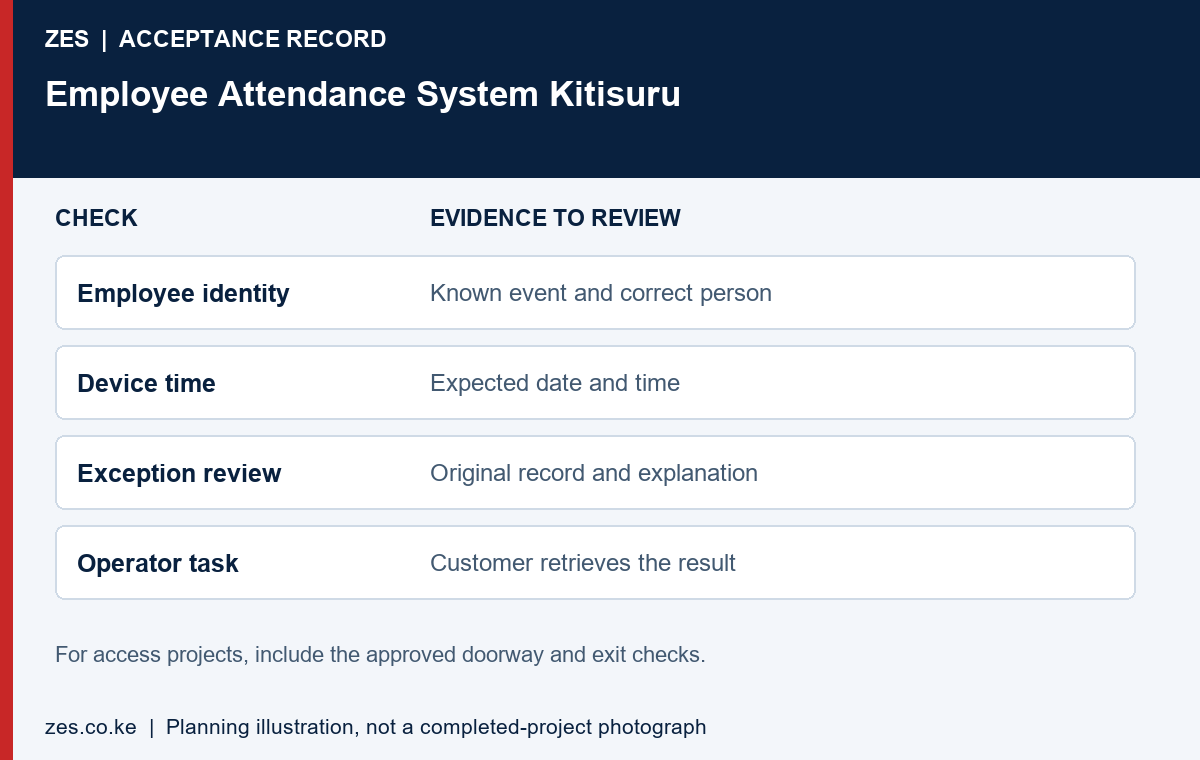
Use a short readiness and acceptance record. Before work, confirm the site contact, approved position, enabling tasks and application access. During testing, record the expected result, observed result and unresolved item. At handover, identify who owns the next action and how it will be reviewed. This gives the customer a practical basis for accepting the actual scope, while avoiding a vague completion statement that cannot be compared with the original requirement.
The proposal should also explain how later changes are managed. A new premises, additional users, changed working patterns or another reporting application can create a different requirement. Keep equipment references and the approved scope available for that review. Ask for revised terms and tests where necessary instead of assuming that the original purchase includes every future alteration. Clear documentation is useful to both the customer and the supplier when the people involved in the original project change.
Information to include in your enquiry
Share the site location, organisation type, staff numbers, clocking points or controlled doors, existing devices and software, and the required outcome. Include available layouts and sample reports with personal information removed. Identify the person who approves building access and the person who will administer the system. Ask the quotation to identify assumptions, exclusions, recurring charges, testing and handover responsibilities.
Frequently asked questions
Can a machine explain why a person did not clock?
No. Equipment and approved work circumstances need review through the employer’s process.
Who decides whether a correction affects payroll?
The employer’s authorised reviewers make decisions under its approved rules and appropriate advice; the terminal does not decide independently.
Related Kitisuru biometric guides
- Biometric Machine Suppliers Kitisuru: Purchase the Required Outcome, Not Only a Terminal
- Biometric Installation Kitisuru: Retrofit Planning Without Losing Service Access
Discuss your requirement with ZES
ZES is based in Kamakis, Ruiru and reviews Kitisuru enquiries before confirming the appropriate assessment and delivery arrangements. Travel, installation timing, equipment availability and support commitments are agreed directly for the actual scope.
Biometric attendance services · Access-control services · Request a quotation · Request a site assessment