

Biometric Installation Kitisuru: Biometric installation in Kitisuru should begin with the condition of the existing property and the supporting routes the equipment needs. Retrofitting a terminal can involve cable access, finished walls, network permissions and a location that remains usable after the installer leaves. This guide explains how to prepare those decisions without assuming a particular building layout. ZES reviews each site and confirms the installation, assessment and delivery arrangements in the agreed scope.

Biometric Installation Kitisuru: Survey the site rather than assuming a route
Provide an overview of the premises, intended clocking point and the location of available power and network equipment. Mark information that has not been verified. A convenient-looking path may cross finished rooms, shared property or areas the customer cannot authorise. The survey should establish access, routing and reinstatement responsibilities. Keep the installation separate from unapproved structural alterations or other building work that requires a competent party’s review.
Consider everyday and service access together
Check who will approach the terminal, whether queues could obstruct movement and how a technician will reach it for maintenance. Equipment should not be positioned solely to hide cables if users cannot use it comfortably. Follow the selected manufacturer’s installation limits. If the site has several entrances, agree which represents the intended attendance event. People should not need to enter another organisation’s space or an unsafe working area merely to clock in.
Confirm supporting infrastructure and ownership
Identify who provides the power source, approved data connection and any containment. A long route may change the installation scope even when the terminal itself is inexpensive. Ask whether the network needs a particular permission or configuration from the responsible IT person. Specify backup requirements for the full agreed function. Record which contractor supplies each dependency so a scheduled visit is not lost because the necessary enabling work remains unassigned.
Stage configuration before full enrolment
Use sample identities to demonstrate recognition, correct time settings, event transfer and report access. Agree software versions, licences and employee identifiers. Do not move operational records from an old system without an authorised migration and validation process. Confirm what happens during connection loss and how the operator recognises a fault. A physical retrofit is complete only against its stated scope; development of a new payroll interface should remain an explicit additional requirement.
Leave a record for the next service visit
Provide device identification, cable-route information, account ownership and the configuration basis appropriate to the installation. Demonstrate routine operation to an authorised representative. List unfinished work and its owner. ZES can assess the Kitisuru location and confirm timing, travel and specialist responsibilities. The aim is a serviceable installation with clear operating limits, rather than a tidy exterior whose hidden routes and administrative access are understood only by the original installer.
An installation handover that can be checked
Before work starts, agree a drawing or marked photograph showing the terminal position, cable route and supporting equipment. Confirm who provides power and network access, what surfaces may be drilled and who approves work around occupied areas. Include a clear completion test: the terminal powers up, its clock is correct, a sample event reaches the agreed software and the administrator can retrieve that event. Record unresolved items before accepting the work.
At handover, identify the installed model, serial number, software licence and administrator account owner. Transfer credentials through an appropriate private process rather than printing them in a public handover report. Ask for a brief demonstration of enrolment, routine exports and raising a support request. Any door-control work should have its own approved safety and exit arrangements; installing an attendance terminal does not automatically establish an appropriate access-control design.
Biometric Installation Kitisuru: supporting guidance
For privacy planning, consult the ODPC guidance notes, including its biometric data guidance. Check equipment and software behaviour against the documentation for the exact proposed version. ZKTeco publishes a ZKBio CVAccess user manual as one product-specific reference; it is not evidence that every device or platform has the same functions. Confirm the model and supported features in your quotation.
A worked example: a retrofit across existing finished premises
Consider an illustrative customer adding a terminal to premises that were not originally planned for the selected equipment. The biometric installation survey needs to consider the approved terminal position and the routes that support it. A simple-looking wall position may require additional work to connect power and the intended application. The proposal should describe those assessed dependencies before treating the project as a standard device mounting exercise.
Ask the customer to identify the people who approve drilling, cabling, access and changes to existing infrastructure. Keep the boundary of the biometric installation clear where other contractors or property managers have responsibility. A photograph can help arrange the survey, but it should not be treated as a complete assessment of concealed routes, surface condition or the suitability of existing services.
Map the route before selecting the visit programme
Record the proposed communication route and any required supporting equipment. Ask the responsible IT contact to confirm the permitted connection method for the selected application. Identify work that another party must complete first. The biometric installation programme should show these dependencies so the customer understands what can be done during the planned attendance and what remains subject to approval.
If routes cross different work areas, agree access and reinstatement arrangements for each one. Record restrictions on working hours or fixing methods where the site team identifies them. Avoid promising a concealed or uninterrupted route without inspection. A clear biometric installation plan should remain understandable when the customer compares it with the quotation and the eventual completion record.
Keep service access and ordinary use in the plan
Choose a terminal position that the intended users can approach and the authorised maintainer can inspect. Consider permission, accessibility and the site’s ordinary circulation with the responsible people. Do not select a position solely because it hides the equipment or makes a marketing image look tidy. The biometric installation needs to work as a daily business process as well as a physical fitting.
Ask how routine inspection, a device replacement or an approved configuration change would be carried out at that position. Record any access dependency that could affect later support. A biometric installation handover should identify those practical conditions rather than leave the customer to discover them when assistance is first required. Future service arrangements should reflect the actual premises and the selected equipment.
Identify what existing equipment can be retained
List the existing devices, application and supporting infrastructure before proposing replacement. Ask which components can be retained and what evidence is needed to confirm that decision. The biometric installation assessment should identify compatibility against actual model references and accessible documentation. Avoid assuming that an existing reader, cable or software licence is suitable merely because it is already present.
Where reuse is proposed, include it in the acceptance tests. Confirm that a sample event reaches the intended application and that the customer can retrieve the agreed output. Record any limitation that remains with retained equipment. The customer should be able to distinguish the supplier’s new work from the condition and supported behaviour of components outside the supplied biometric installation scope.
Biometric installation: turn the survey into a work package
A biometric installation survey should produce a usable plan. Record the proposed terminal location, mounting surface, approach route, power source, communication route and intended application. Identify which facilities and IT contacts approve the work. Photograph or mark the relevant routes with permission and avoid including confidential material in general tender documents. The quotation should distinguish what has been surveyed from what remains an assumption requiring confirmation.
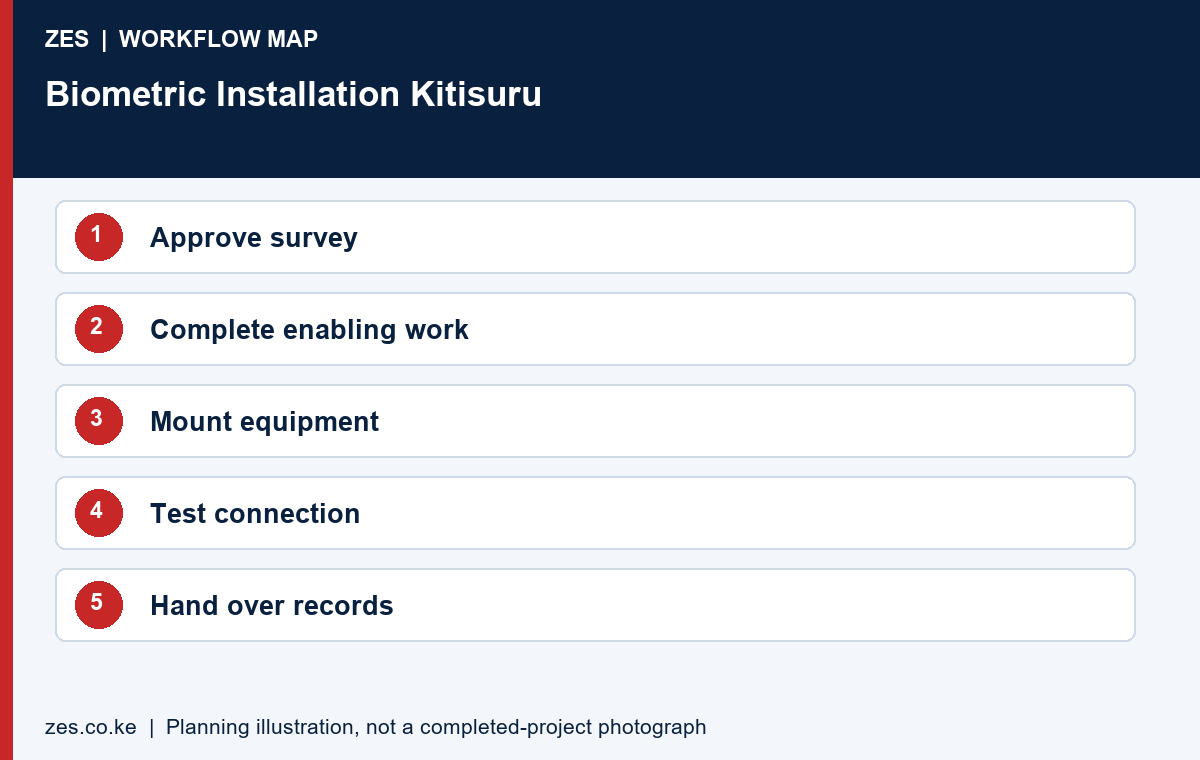
Divide the biometric installation into enabling work, equipment mounting, connectivity, configuration, testing and handover. Name the party responsible for each stage. If a customer or another contractor supplies the network point, state when it must be ready and what connectivity the selected system needs. If electrical work is required, assign it to the appropriate competent contractor. This division makes it easier to diagnose delays without treating every unfinished dependency as a device fault.
Installation sequencing and change control
Agree a biometric installation sequence that suits the occupied premises. Confirm access arrangements, working hours, material delivery, permitted fixing methods and how the work area will be left usable. Record any temporary protection or reinstatement responsibilities. A clear sequence helps the customer coordinate building management, the installer and other contractors. It also provides a basis for checking whether the proposed completion date depends on work that has not yet been approved.
Use a written variation record when a biometric installation survey assumption changes. State the new route, additional equipment or revised working arrangement and identify the resulting cost and time implications before proceeding. Keep the original scope alongside the agreed variation. This is particularly useful where finished surfaces, shared infrastructure or restricted working hours become apparent only after a closer site inspection. A variation should explain the change rather than hide it inside a revised total.
Commission the whole biometric installation
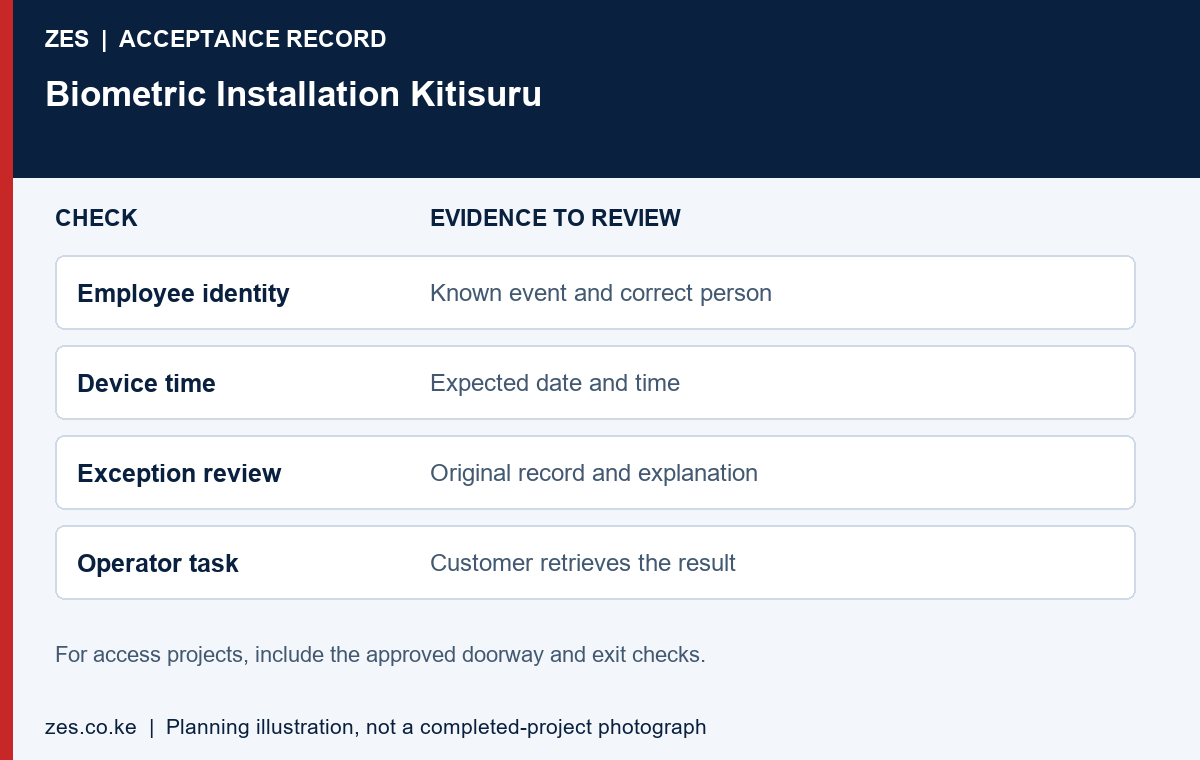
Commissioning should follow the intended event from the biometric installation to the actual output. Confirm equipment identity, the configured time, connection to the intended application and association with a sample user. Retrieve the resulting record through the intended administrator account. Where door control is included, the approved hardware and exit arrangements require their own competent assessment and acceptance checks. Attendance commissioning alone does not establish that a controlled doorway is suitable for use.
Keep a biometric installation completion sheet with expected results, observed results, outstanding items and the people who witnessed the test. Include a connection interruption test only under an agreed method that will not disrupt unrelated systems. Identify the conditions under which the customer will accept the installation and how outstanding work will be tracked. A signed equipment delivery note and a working end-to-end system demonstrate different things; retain evidence for both where both are required.
Handover and maintenance boundaries
The biometric installation handover should identify the equipment, application, licence basis, account owner, support contact and basic operating procedure. Demonstrate enrolment, a routine report and the approved handling of a failed clocking attempt. Transfer administrative access through a private process. Keep passwords out of public project photographs and general proposal documents. Confirm whether follow-up assistance is included, time limited or separately quoted.
Agree what routine biometric installation maintenance means for the selected equipment. Follow the manufacturer’s instructions for cleaning and environmental limits rather than applying a generic method to every reader. Identify who checks time settings, application availability and recurring licences. Define what the customer can inspect safely and what requires technical attendance. Maintenance commitments should identify the actual scope and response arrangements without implying a guaranteed service level that has not been contracted.
Control variations and completion responsibilities
Use a written change record if inspection identifies a different route, additional supporting equipment or revised working arrangement. State the reason and implications before proceeding. Keep approval with the appropriate customer contact. This makes the biometric installation cost and programme easier to manage and avoids an unexplained difference between the original proposal and the final delivered work.
Assign responsibility for each outstanding item at commissioning. A power dependency, application setting and damaged mounting surface may require different parties. The biometric installation completion sheet should identify the issue, owner and agreed next step. Do not mark the full operational requirement complete simply because the terminal has been delivered or fixed to the selected wall.
Commission with an invented user and a known event
During biometric installation commissioning, confirm the equipment identity and configured time. Use an invented user to create a known event and retrieve it through the intended application. Check the employee association and reporting date. Ask the intended operator to perform a routine retrieval so that usability forms part of the handover rather than remaining an assumption based on the technician’s demonstration.
Where an interruption test is relevant, agree the method and expected recovery behaviour first. Avoid disrupting unrelated customer systems. Compare the sample events after restoration and document any limits. The biometric installation record should describe what was actually tested with the selected configuration, without turning one successful trial into a general guarantee about every future network or power condition.
Plan support information for a future maintainer
Keep the biometric installation equipment references, application arrangement, approved route description and support contact in the customer’s private handover file. Identify who owns administrative access and how it is transferred appropriately. Avoid publishing internal network details, passwords or operational security information in a general project photograph or public quotation attachment.
Document routine operator tasks and the circumstances that require technical help. Confirm whether follow-up attendance, software assistance and changes to the requirement are included or separately quoted. A future maintainer should be able to understand the biometric installation from the records rather than depend entirely on an informal conversation with the person who carried out the original work.
Prepare the Kitisuru biometric installation brief
Send ZES the intended use, site location, approximate users, existing equipment and application. Describe the proposed work area and any known restrictions on routes, access or finishes. Include approved plans or appropriate photographs when available. Identify the customer contacts who can authorise site access and coordinate the supporting infrastructure.
Ask the proposal to distinguish surveyed work from assumptions and customer-supplied tasks. Confirm assessment and delivery arrangements directly for the actual premises. This page is a retrofit planning guide and does not establish a fixed biometric installation price, a guaranteed completion period or an unverified claim of work at a named Kitisuru property.
A private and usable project handover
Keep a private implementation file alongside the public buying guide. It should identify the supplied equipment, application arrangement, account owner, support contact and agreed acceptance results. Separate public marketing material from operational configuration and employee records. For an initial enquiry, anonymised examples are usually more useful than a large collection of personal records because they show the required output without exposing information unrelated to the purchase decision.
Ask the responsible organisation to review the purpose, necessity and handling of biometric information with appropriate advisers before live enrolment. The selected product documentation should explain its actual supported functions, but a technical specification does not by itself establish that every proposed use is appropriate. Confirm responsibilities for administration, access to reports, profile withdrawal and the organisation’s approved retention arrangements. Keep those decisions connected to the intended workflow rather than relying on a generic claim that a device is compliant.
Use a short readiness and acceptance record. Before work, confirm the site contact, approved position, enabling tasks and application access. During testing, record the expected result, observed result and unresolved item. At handover, identify who owns the next action and how it will be reviewed. This gives the customer a practical basis for accepting the actual scope, while avoiding a vague completion statement that cannot be compared with the original requirement.
The proposal should also explain how later changes are managed. A new premises, additional users, changed working patterns or another reporting application can create a different requirement. Keep equipment references and the approved scope available for that review. Ask for revised terms and tests where necessary instead of assuming that the original purchase includes every future alteration. Clear documentation is useful to both the customer and the supplier when the people involved in the original project change.
Information to include in your enquiry
Share the site location, organisation type, staff numbers, clocking points or controlled doors, existing devices and software, and the required outcome. Include available layouts and sample reports with personal information removed. Identify the person who approves building access and the person who will administer the system. Ask the quotation to identify assumptions, exclusions, recurring charges, testing and handover responsibilities.
Frequently asked questions
Can a terminal be fitted without visible cables?
Routing options depend on the building, permissions and manufacturer requirements. Concealment and reinstatement should be agreed in the quotation.
Can the existing network always be used?
No. Capacity, permitted connections, security controls and device compatibility need assessment by the responsible technical parties.
Related Kitisuru biometric guides
- Fingerprint Attendance System Kitisuru: Enrolment Quality for a Smaller Workforce
- Employee Attendance System Kitisuru: Reviewable Records for Changing Staff Duties
Discuss your requirement with ZES
ZES is based in Kamakis, Ruiru and reviews Kitisuru enquiries before confirming the appropriate assessment and delivery arrangements. Travel, installation timing, equipment availability and support commitments are agreed directly for the actual scope.
Biometric attendance services · Access-control services · Request a quotation · Request a site assessment