
Biometric Machine Suppliers Kitisuru: Biometric machine suppliers serving a Kitisuru project should be compared against the same intended outcome. A small attendance installation, an access-controlled doorway and a multi-site reporting platform do not need identical equipment or software. This guide helps a buyer separate essential scope from optional features. ZES reviews equipment enquiries and confirms model suitability, current availability, installation and written terms for each project rather than publishing an unverified stock or price promise.
Biometric Machine Suppliers Kitisuru: Write a proportional equipment brief
State users, clocking points, recognition requirements and the reports or access functions needed. Include the available administration capacity. Ask suppliers to explain how the model fits those requirements instead of only listing maximum capacity. A more complicated platform may introduce costs and routine tasks that a smaller employer does not need. Conversely, a basic terminal may be poor value if it cannot support the approved reporting workflow.
Check the software the machine depends on
Identify the exact model and proposed software version, hosting and licences. Ask which functions belong to the terminal and which require another application. Confirm supported communication methods and accessible interface documentation. Device branding does not prove compatibility with an existing payroll or access platform. A spreadsheet export may be sufficient for one workflow and inadequate for another; the comparison should state which deliverable is actually being purchased.
Separate equipment, site work and enabling tasks
Request supply, accessories, delivery, mounting, power, networking, configuration, tests and training as identifiable items. Note which work the owner or another contractor must provide. Longer routes and finished surfaces can change installation cost even where device prices match. Confirm survey and travel charges. A supplier offering only a box should not be compared directly with a proposal that includes a working and documented installation unless the remaining tasks are properly budgeted.
Ask for current and verifiable commercial terms
Availability, pricing, warranty and replacement terms should come from the actual written quotation. Ask for evidence of any claimed vendor authorisation or relevant qualification. A product logo or generic marketing photograph does not establish those claims. Identify recurring licences and what happens if they are not renewed. Agree which support tasks are included and how additional work is approved. The buyer should understand access to records and account ownership before placing the order.
Use a demonstration and handover checklist
Test sample recognition, correct employee association, event transfer and the intended output. Include the relevant exception or door-control functions under the approved scope. Have the intended operator perform routine tasks. Retain equipment identification, licensing basis and configuration records. ZES can assess the Kitisuru requirement and confirm a practical next step. Acceptance should leave a usable system with named responsibilities, rather than an unexplained terminal whose routine operation depends indefinitely on the supplier.
A supplier comparison with measurable deliverables
Compare quotations against the same user count, device count and agreed outcome. Separate the terminal price from software, licences, installation, networking, commissioning and training. Ask which items are optional and which are necessary for the promised function. Obtain current availability and warranty terms in writing. A low device-only price is useful only when the buyer also understands the cost and responsibility for making it work.
Ask each supplier to demonstrate the intended reporting or access workflow using the proposed model and software. Identify recurring fees, renewal conditions and access to the organisation records. Check any claimed vendor authorisation against evidence rather than assuming that a product logo proves it. The comparison should finish with a named support contact, an acceptance checklist and a clear list of exclusions that the buyer can budget for.
Biometric Machine Suppliers Kitisuru: supporting guidance
For privacy planning, consult the ODPC guidance notes, including its biometric data guidance. Check equipment and software behaviour against the documentation for the exact proposed version. ZKTeco publishes a ZKBio CVAccess user manual as one product-specific reference; it is not evidence that every device or platform has the same functions. Confirm the model and supported features in your quotation.
A worked example: buying proportionately for a smaller employer
Consider an illustrative buyer deciding between a basic biometric machine and a more extensive reporting platform. The right choice depends on the intended output and the organisation’s operating capacity. Start with users, clocking points, required reports and the person who will administer the result. Additional features should solve a defined requirement rather than make the equipment list appear more impressive.
Ask each supplier to explain how the proposed biometric machine meets that brief. Identify functions performed by the terminal and those requiring another application or licence. A compact device may be suitable for a defined task, but it should not be described as a complete multi-site solution without evidence. Conversely, a complex platform may introduce administration that the customer does not need.
Write a comparable procurement brief
Prepare one requirement for all biometric machine suppliers. State whether you need supply only, an installed attendance system, a controlled doorway or an assessment of existing equipment. Include the approximate users, existing application and relevant site information. Ask suppliers to distinguish included scope, exclusions and assumptions requiring further inspection.
Use that common brief to compare quotations. A supplier who quotes a biometric machine alone should not be assumed to provide mounting, networking, software and training unless those tasks are included. Add missing responsibilities and costs to the comparison. The buyer can then choose a narrower offer knowingly, rather than discover after delivery that important parts of the intended outcome were never ordered.
Check model and software compatibility
Request the actual biometric machine model reference and software version. Ask for documentation of the supported connection methods and relevant functions. If an existing application must be retained, identify the interface requirements before selecting replacement equipment. Device branding or a matching connector does not establish that the proposed workflow will operate as required.
Ask the supplier to demonstrate a known event using the proposed application. Retrieve the required report or show the separately approved access-control function. Record any limitation and the configuration demonstrated. A biometric machine demonstration should match the purchased purpose rather than rely on a different system that happens to produce a convincing presentation.
Account for supporting site work
A biometric machine’s catalogue price does not describe the full installation at existing premises. The survey should identify mounting, supporting power, communication routes and application access. Ask which tasks the customer or another contractor must provide. Finished surfaces and access restrictions should be assessed at the actual site rather than inferred from a general description of the area.
Ask the quotation to separate equipment, accessories, enabling work, configuration, tests and training. Record logistics and the process for approving changes. This makes the biometric machine comparison easier to understand when the proposed routes or responsibilities differ between suppliers. The buyer should be able to identify what is needed to reach a working result without relying on undocumented assumptions.
Biometric machine procurement: compare the whole system
A biometric machine quotation should identify the proposed model and the outcome it supports. State the intended users, clocking points or doors, recognition method and required reports. Ask the supplier to separate supported functions from features that need another application, licence or component. A biometric machine is not automatically a complete attendance or access-control system simply because the product description mentions both purposes.
Compare the biometric machine with its proposed software and installation scope. Identify hosting, licences, administrator access, supporting power, networking, mounting and training. Ask which components the customer must provide and which are included in the quoted price. A device-only offer and an installed solution can both be legitimate, but they should be compared after the missing responsibilities and costs have been made visible. Avoid deciding from the terminal price alone.
Verify a biometric machine proposal
Request the biometric machine model reference and the documentation for the actual software version. Check the supported connection methods, operating conditions and required accessories against the proposed site. Ask for a demonstration of the intended workflow rather than treating a maximum capacity figure as a performance guarantee. Any claimed manufacturer authorisation, qualification or warranty arrangement should be supported by evidence that the buyer can check.
Biometric machine availability and commercial terms should come from a current written quotation. Confirm delivery assumptions, warranty handling, replacement arrangements and recurring charges. Ask what happens when a licence is not renewed or a supplier relationship ends. Identify the organisation’s access to its own reports and administration accounts. Generic website prices and product photographs do not establish a commitment to a particular model, configuration or delivery date.
Acceptance tests for a supplied biometric machine
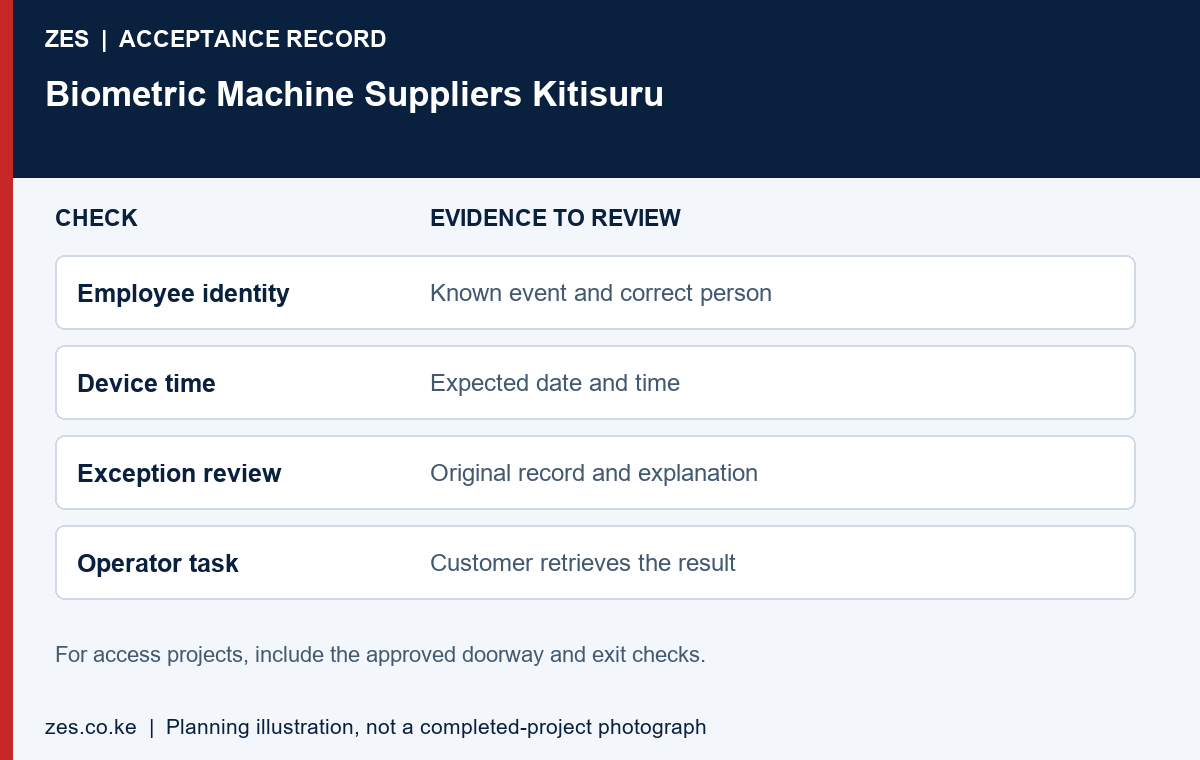
A biometric machine demonstration should use the intended credential method and sample identities. Record an event and retrieve it in the proposed application. If attendance reporting is required, inspect the actual summary or export. If access control is required, include the approved opening and permission checks under the competent design review. The selected demonstration should match the purchased purpose; a recognition message alone does not prove every advertised application function.
Check the biometric machine handover against the quotation. Confirm equipment identification, the licence basis, account owner, completed tests and unresolved items. Have the intended operator perform an ordinary task, such as retrieving a report or raising a support request. Keep passwords and sensitive configuration details out of general procurement attachments. A useful completion record helps the buyer operate the installation and compare the delivered scope with what was ordered.
Budget for ownership of the biometric machine
Biometric machine ownership can involve recurring software, connectivity, maintenance and administrator effort. Ask the supplier to identify recurring items separately from equipment supply and installation. Confirm which costs vary with users, sites or functions. Use the same comparison period across proposals. A lower initial price may be appropriate, but the buyer should understand the operating responsibilities before deciding whether the full proposal fits the organisation’s budget.
Plan how the biometric machine will be supported after the original installer leaves. Identify the contact route, information needed for diagnosis and the limits of included support. Ask whether changes to staff numbers, premises or reporting requirements need a new licence or additional configuration. Keep a copy of the approved scope and equipment details. Future decisions are easier when the installation is documented as an owned business system rather than an unexplained device on a wall.
Verify commercial terms before ordering
Obtain current availability, pricing and warranty handling in writing for the proposed biometric machine and configuration. Ask for evidence of any claimed authorisation or qualification relevant to the purchase. A logo or generic product photograph does not establish those claims. Identify the party responsible for support and the information needed to raise an equipment issue.
Separate a product warranty from routine administration, network support and a later change to the requirement. Ask which costs are included if equipment needs diagnosis or replacement. Avoid a vague promise that every future issue is covered. Clear terms make it easier to assess whether the complete biometric machine proposal fits the customer’s budget and operational expectations.
Review recurring costs and record ownership
Ask which biometric machine functions depend on recurring software or service charges. Confirm how those charges vary with users, devices or sites and what happens if they are not renewed. Identify the customer account owner and access to reports. These terms should come from the actual proposal rather than an assumption that every reader operates indefinitely without an application or licence.
Consider the customer’s administration time as part of ownership. A more complicated biometric machine arrangement may need additional routine work or training. Have the intended operator perform a sample task before deciding. The proposal should make clear which tasks the customer can manage and which require technical assistance, so the operating model remains practical after the supplier’s initial demonstration.
Agree acceptance and handover evidence
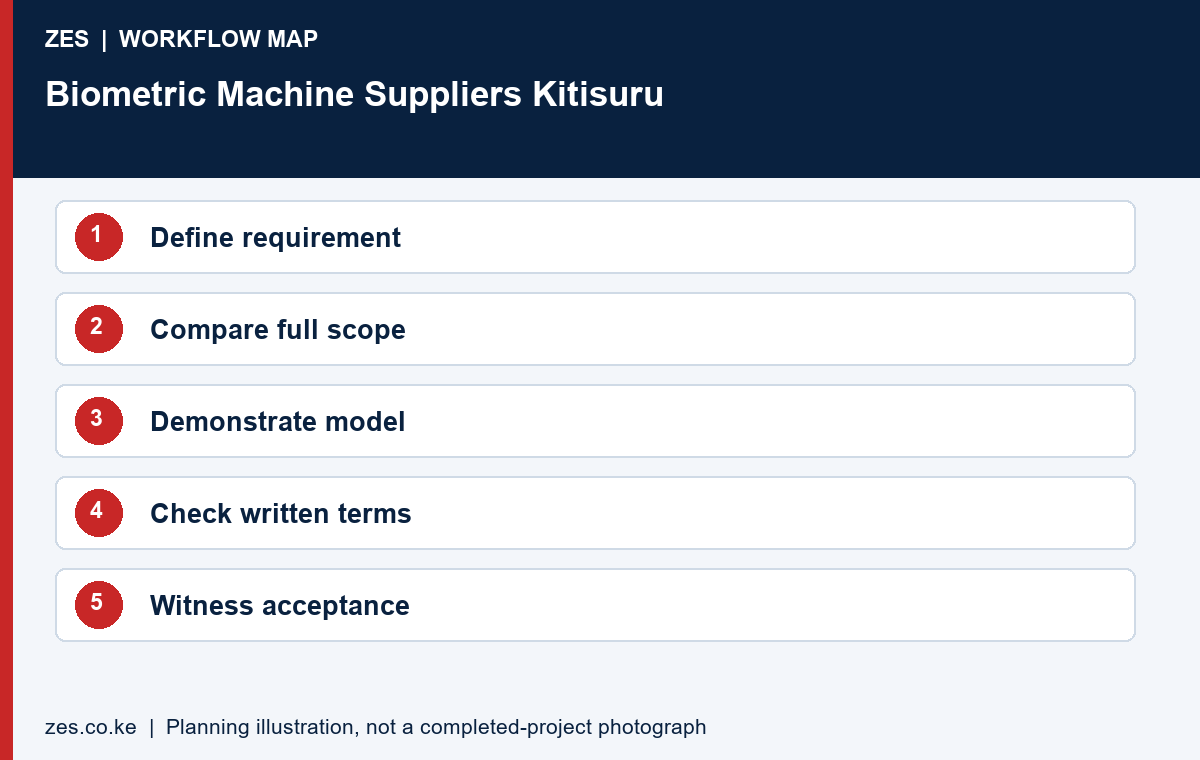
Set measurable biometric machine acceptance criteria before the order. Identify the model, licences and accessories to be delivered. Witness the intended event-to-report or approved doorway checks and confirm training. Record unresolved items and exclusions. The customer should be able to compare the delivered work with the original requirement, not only confirm that a box has arrived.
Keep equipment identification, account ownership, application arrangement and support contacts in the handover record. Transfer sensitive details privately. If another contractor completes installation after supply, identify who tests the combined result. A documented biometric machine purchase provides a clearer basis for future changes than an informal assurance that the equipment should work with any system the customer later selects.
Send ZES the Kitisuru biometric machine brief
Describe the required function, workforce, existing equipment and intended output. State whether you need a replacement device, supply only or a complete installed workflow. Include procurement conditions that the quotation must address. Share suitable plans or anonymised examples where useful, while keeping confidential configuration and operational biometric records out of the initial enquiry.
ZES can review the requirement and confirm the appropriate assessment, proposal and site-attendance arrangements. Ask for current equipment and commercial terms in writing. This buyer guide does not claim a supplier office in Kitisuru, a live stock commitment, a fixed biometric machine price or a manufacturer-authorised status that has not been verified.
A private and usable project handover
Keep a private implementation file alongside the public buying guide. It should identify the supplied equipment, application arrangement, account owner, support contact and agreed acceptance results. Separate public marketing material from operational configuration and employee records. For an initial enquiry, anonymised examples are usually more useful than a large collection of personal records because they show the required output without exposing information unrelated to the purchase decision.
Ask the responsible organisation to review the purpose, necessity and handling of biometric information with appropriate advisers before live enrolment. The selected product documentation should explain its actual supported functions, but a technical specification does not by itself establish that every proposed use is appropriate. Confirm responsibilities for administration, access to reports, profile withdrawal and the organisation’s approved retention arrangements. Keep those decisions connected to the intended workflow rather than relying on a generic claim that a device is compliant.
Use a short readiness and acceptance record. Before work, confirm the site contact, approved position, enabling tasks and application access. During testing, record the expected result, observed result and unresolved item. At handover, identify who owns the next action and how it will be reviewed. This gives the customer a practical basis for accepting the actual scope, while avoiding a vague completion statement that cannot be compared with the original requirement.
The proposal should also explain how later changes are managed. A new premises, additional users, changed working patterns or another reporting application can create a different requirement. Keep equipment references and the approved scope available for that review. Ask for revised terms and tests where necessary instead of assuming that the original purchase includes every future alteration. Clear documentation is useful to both the customer and the supplier when the people involved in the original project change.
Information to include in your enquiry
Share the site location, organisation type, staff numbers, clocking points or controlled doors, existing devices and software, and the required outcome. Include available layouts and sample reports with personal information removed. Identify the person who approves building access and the person who will administer the system. Ask the quotation to identify assumptions, exclusions, recurring charges, testing and handover responsibilities.
Frequently asked questions
Does this page confirm a supplier office in Kitisuru?
No. Confirm the provider’s actual business location, site attendance and logistics directly.
Can I compare a device-only quote with a full installation?
Only after adding and checking the missing software, supporting works, configuration, training and support scope.
Related Kitisuru biometric guides
- Biometric Attendance System Kitisuru: Plan Records for a Small or Distributed Employer
- Fingerprint Attendance System Kitisuru: Enrolment Quality for a Smaller Workforce
Discuss your requirement with ZES
ZES is based in Kamakis, Ruiru and reviews Kitisuru enquiries before confirming the appropriate assessment and delivery arrangements. Travel, installation timing, equipment availability and support commitments are agreed directly for the actual scope.
Biometric attendance services · Access-control services · Request a quotation · Request a site assessment